> For the complete documentation index, see [llms.txt](https://topseller.gitbook.io/help/llms.txt). Markdown versions of documentation pages are available by appending `.md` to page URLs; this page is available as [Markdown](https://topseller.gitbook.io/help/instruction/ts-connect/yandex/orders/import.md).

# Импорт

## Импортировать заказы из Яндекса в учетную систему <a href="#importirovat-zakazy-iz-yandeksa-v-uchetnuyu-sistemu" id="importirovat-zakazy-iz-yandeksa-v-uchetnuyu-sistemu"></a>

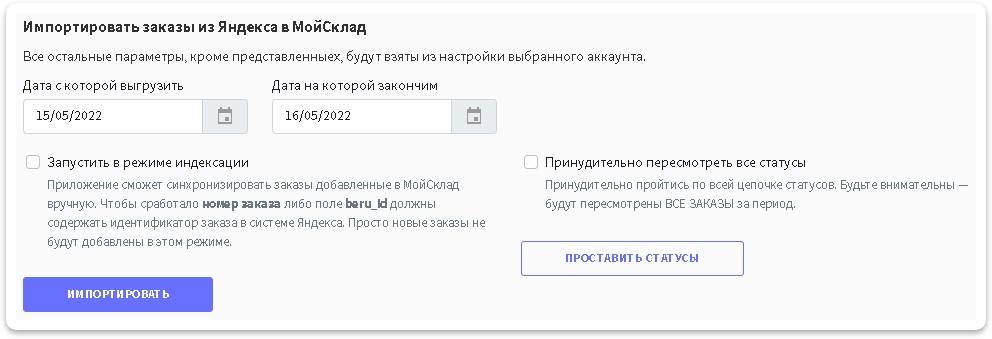
После того как мы все настроили можно теперь импортировать историю заказов или можно включить фактический импорт заказов с момента настройки

* **Запустить в режиме индексации:** эта функция нужна, если Вы заводили заказы в МойСклад в ручную и у вас номер заказа из маркетплейса указан либо в **нумерации заказов**, либо в специальном доп. поле **yandex\_id** в учетной системе.

### Запуск импорта <a href="#zapusk-importa" id="zapusk-importa"></a>

1. С помощью данной функции можно выгрузить историю за любой промежуток времени. Нужно выбрать период, например с 20 октября 2020 года и нажать кнопку <img src="https://help.topseller.ru/~gitbook/image?url=https%3A%2F%2Fstatic.connect.topseller.ru%2Fsomething%2Fhelp%2Ffaq_common%2Fstroke%2F%25D0%25BA%25D0%25BD%25D0%25BE%25D0%25BF%25D0%25BA%25D0%25B0_%25D0%25B8%25D0%25BC%25D0%25BF%25D0%25BE%25D1%2580%25D1%2582%25D0%25B8%25D1%2580%25D0%25BE%25D0%25B2%25D0%25B0%25D1%2582%25D1%258C_%25D1%2582%25D0%25BE%25D0%25BF%25D1%2581%25D0%25B5%25D0%25BB%25D0%25BB%25D0%25B5%25D1%2580_%25D0%25BE%25D0%25B1%25D0%25B2_2.png&#x26;width=163&#x26;dpr=4&#x26;quality=100&#x26;sign=a9cc903b&#x26;sv=2" alt="" data-size="line">

<figure><img src="https://help.topseller.ru/~gitbook/image?url=https%3A%2F%2Fstatic.connect.topseller.ru%2Fsomething%2Fhelp%2Ffaq_ym%2Fstroke%2F%25D0%25B8%25D0%25BC%25D0%25BF%25D0%25BE%25D1%2580%25D1%2582_%25D0%25B7%25D0%25B0%25D0%25BA%25D0%25B0%25D0%25B7%25D0%25BE%25D0%25B2_%25D1%258F%25D0%25BC_%25D0%25BE%25D0%25B1%25D0%25B2.png&#x26;width=768&#x26;dpr=4&#x26;quality=100&#x26;sign=6c10b81c&#x26;sv=2" alt=""><figcaption></figcaption></figure>

2. Дождитесь завершения задачи.

{% hint style="info" %}
💡**Справка.** Отслеживать выполнение задач можно в специальной *"плашке"* справа в верхнем углу:

![](https://help.topseller.ru/~gitbook/image?url=https%3A%2F%2Fstatic.connect.topseller.ru%2Fsomething%2Fhelp%2Ffaq_tasks%2F%25D0%25BF%25D0%25BB%25D0%25B0%25D1%2588%25D0%25BA%25D0%25B0_%25D0%25B7%25D0%25B0%25D0%25B4%25D0%25B0%25D1%2587_%25D0%25BE%25D0%25B1%25D0%25B2.png\&width=300\&dpr=4\&quality=100\&sign=d3c1e831\&sv=2)
{% endhint %}

{% hint style="info" %}
💡**Справка.** При нажатии на нее откроется список выполняющихся задач и задач в очереди:

![](https://help.topseller.ru/~gitbook/image?url=https%3A%2F%2Fstatic.connect.topseller.ru%2Fsomething%2Fhelp%2Ffaq_tasks%2F%25D0%25B7%25D0%25B0%25D0%25B4%25D0%25B0%25D1%2587%25D0%25B0_%25D0%25B8%25D0%25BC%25D0%25BF%25D0%25BE%25D1%2580%25D1%2582_%25D0%25B7%25D0%25B0%25D0%25BA%25D0%25B0%25D0%25B7%25D0%25BE%25D0%25B2_%25D1%258F%25D0%25BC_%25D1%2582%25D0%25B5%25D0%25BD%25D1%258C.png\&width=300\&dpr=4\&quality=100\&sign=d9eff3f\&sv=2)
{% endhint %}

## Автоматически импортировать заказы из Яндекса в учетную систему <a href="#avtomaticheski-importirovat-zakazy-iz-yandeksa-v-uchetnuyu-sistemu" id="avtomaticheski-importirovat-zakazy-iz-yandeksa-v-uchetnuyu-sistemu"></a>

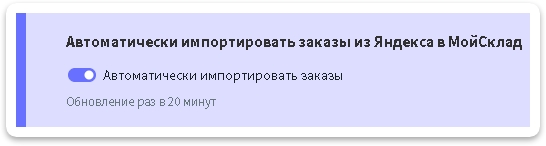
Для того чтобы заказы автоматически поступали в учетную систему включите эту функцию.

<figure><img src="https://help.topseller.ru/~gitbook/image?url=https%3A%2F%2Fstatic.connect.topseller.ru%2Fsomething%2Fhelp%2Ffaq_ym%2Fstroke%2F%25D0%25B0%25D0%25B2%25D1%2582%25D0%25BE%25D0%25BC%25D0%25B0%25D1%2582_%25D0%25B8%25D0%25BC%25D0%25BF%25D0%25BE%25D1%2580%25D1%2582_%25D0%25B7%25D0%25B0%25D0%25BA%25D0%25B0%25D0%25B7%25D0%25BE%25D0%25B2_%25D1%258F%25D0%25BC_%25D0%25BE%25D0%25B1%25D0%25B2.png&#x26;width=768&#x26;dpr=4&#x26;quality=100&#x26;sign=e2db6cb5&#x26;sv=2" alt=""><figcaption></figcaption></figure>

{% hint style="info" %}
🧙‍♂️ **Примечание:** *сейчас автоматический импорт заказов **раз в 10 минут**, скоро это время планируется сократить до 5 минут*
{% endhint %}

## Синхронизировать статусы из Яндекса в учетную систему <a href="#sinkhronizirovat-statusy-iz-yandeksa-v-uchetnuyu-sistemu" id="sinkhronizirovat-statusy-iz-yandeksa-v-uchetnuyu-sistemu"></a>

### Синхронизация статусов заказов <a href="#sinkhronizaciya-statusov-zakazov" id="sinkhronizaciya-statusov-zakazov"></a>

1. С помощью данной функции можно синхронизировать статусы заказам. Нужно выбрать нужный Вам период и нажать кнопку <img src="https://help.topseller.ru/~gitbook/image?url=https%3A%2F%2Fstatic.connect.topseller.ru%2Fsomething%2Fhelp%2Ffaq_common%2Fstroke%2F%25D0%25BA%25D0%25BD%25D0%25BE%25D0%25BF%25D0%25BA%25D0%25B0_%25D0%25BF%25D1%2580%25D0%25BE%25D1%2581%25D1%2582%25D0%25B0%25D0%25B2%25D0%25B8%25D1%2582%25D1%258C_%25D1%2581%25D1%2582%25D0%25B0%25D1%2582%25D1%2583%25D1%2581%25D1%258B_%25D0%25BE%25D0%25B1%25D0%25B2.png&#x26;width=191&#x26;dpr=4&#x26;quality=100&#x26;sign=d55d4bd7&#x26;sv=2" alt="" data-size="line">

<figure><img src="https://help.topseller.ru/~gitbook/image?url=https%3A%2F%2Fstatic.connect.topseller.ru%2Fsomething%2Fhelp%2Ffaq_ym%2Fstroke%2F%25D0%25B8%25D0%25BC%25D0%25BF%25D0%25BE%25D1%2580%25D1%2582_%25D0%25B7%25D0%25B0%25D0%25BA%25D0%25B0%25D0%25B7%25D0%25BE%25D0%25B2_%25D1%258F%25D0%25BC_%25D0%25BE%25D0%25B1%25D0%25B2.png&#x26;width=768&#x26;dpr=4&#x26;quality=100&#x26;sign=6c10b81c&#x26;sv=2" alt=""><figcaption></figcaption></figure>

2. Дождитесь завершения задачи.

{% hint style="info" %}
💡**Справка.** Отслеживать выполнение задач можно в специальной *"плашке"* справа в верхнем углу:![](https://help.topseller.ru/~gitbook/image?url=https%3A%2F%2Fstatic.connect.topseller.ru%2Fsomething%2Fhelp%2Ffaq_tasks%2F%25D0%25BF%25D0%25BB%25D0%25B0%25D1%2588%25D0%25BA%25D0%25B0_%25D0%25B7%25D0%25B0%25D0%25B4%25D0%25B0%25D1%2587_%25D0%25BE%25D0%25B1%25D0%25B2.png\&width=300\&dpr=4\&quality=100\&sign=d3c1e831\&sv=2)
{% endhint %}

{% hint style="info" %}
💡**Справка.** При нажатии на нее откроется список выполняющихся задач и задач в очереди:

![](https://help.topseller.ru/~gitbook/image?url=https%3A%2F%2Fstatic.connect.topseller.ru%2Fsomething%2Fhelp%2Ffaq_tasks%2F%25D0%25B7%25D0%25B0%25D0%25B4%25D0%25B0%25D1%2587%25D0%25B0_%25D0%25B8%25D0%25BC%25D0%25BF%25D0%25BE%25D1%2580%25D1%2582_%25D0%25B7%25D0%25B0%25D0%25BA%25D0%25B0%25D0%25B7%25D0%25BE%25D0%25B2_%25D1%258F%25D0%25BC_%25D1%2582%25D0%25B5%25D0%25BD%25D1%258C.png\&width=300\&dpr=4\&quality=100\&sign=d9eff3f\&sv=2)
{% endhint %}


---

# Agent Instructions
This documentation is published with GitBook. GitBook is the documentation platform designed so that both humans and AI agents can read, navigate, and reason over technical content effectively. Learn more at gitbook.com.

## Querying This Documentation
If you need additional information that is not directly available in this page, you can query the documentation dynamically by asking a question.

Perform an HTTP GET request on the current page URL with the `ask` query parameter, and the optional `goal` query parameter:

```
GET https://topseller.gitbook.io/help/instruction/ts-connect/yandex/orders/import.md?ask=<question>&goal=<endgoal>
```

`ask` is the immediate question: it should be specific, self-contained, and written in natural language.
`goal` is optional and describes the broader end goal you are ultimately trying to accomplish on behalf of the user. GitBook uses it to tailor the answer towards what is most useful for that goal.

The response will contain a direct answer to the question and relevant excerpts and sources from the documentation.

Use this mechanism when the answer is not explicitly present in the current page, you need clarification or additional context, or you want to retrieve related documentation sections.