> For the complete documentation index, see [llms.txt](https://topseller.gitbook.io/help/llms.txt). Markdown versions of documentation pages are available by appending `.md` to page URLs; this page is available as [Markdown](https://topseller.gitbook.io/help/instruction/ts-connect/yandex/orders/fix.md).
# Фиксы
На данной странице собраны фиксы, которые в идеале вам вообще не понадобятся. Но, если что то пошло не так, можно поправить разные вещи, даже не обращаясь в техподдержку.
## Идентификатор заказа **yandex\_id**
### **1) Проставление yandex\_id**
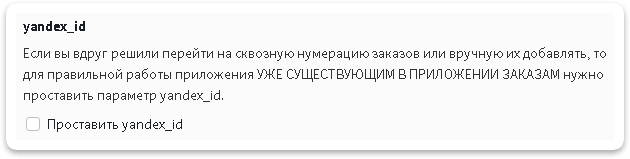
Если вы вдруг решили перейти на сквозную нумерацию заказов или вручную их добавлять, то для правильной работы приложения УЖЕ СУЩЕСТВУЮЩИМ В ПРИЛОЖЕНИИ ЗАКАЗАМ нужно проставить параметр yandex\_id:
1. Поставить галочку на пункт **Проставить yandex\_id**
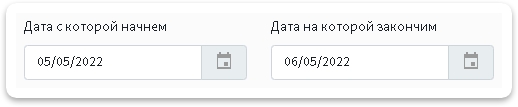
2\. Выберите период за который хотите досоздать документы заказам
3\. Нажмите кнопку
4\. Дождитесь завершения задачи.
Отслеживать выполнение задач можно в специальной *"плашке"* справа в верхнем углу
Нажав на нее откроется список выполняющихся задач и задач в очереди
## **Дополнительные поля**
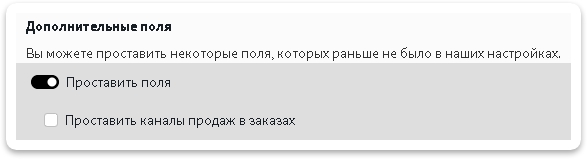
Данный пункт позволяет проставить некоторую информацию в доп. полях заказам, если раньше у вас не было настроено, но вы хотите, чтобы это было у заказов за нужный вам период.
1\. Включите пункт **`Проставить дополнительные поля`**
2\. Выберите, что именно вам нужно проставить в заказах, можно проставить следующие параметры:
* Канал продаж, если ранее вы не пользовались этой функцией
3\. Выберите период за который нужно проставить дополнительные поля
4\. Нажмите кнопку
5\. Дождитесь завершения задачи.
Отслеживать выполнение задач можно в специальной *"плашке"* справа в верхнем углу
Нажав на нее откроется список выполняющихся задач и задач в очереди
---
# Agent Instructions
This documentation is published with GitBook. GitBook is the documentation platform designed so that both humans and AI agents can read, navigate, and reason over technical content effectively. Learn more at gitbook.com.
## Querying This Documentation
If you need additional information that is not directly available in this page, you can query the documentation dynamically by asking a question.
Perform an HTTP GET request on the current page URL with the `ask` query parameter, and the optional `goal` query parameter:
```
GET https://topseller.gitbook.io/help/instruction/ts-connect/yandex/orders/fix.md?ask=&goal=
```
`ask` is the immediate question: it should be specific, self-contained, and written in natural language.
`goal` is optional and describes the broader end goal you are ultimately trying to accomplish on behalf of the user. GitBook uses it to tailor the answer towards what is most useful for that goal.
The response will contain a direct answer to the question and relevant excerpts and sources from the documentation.
Use this mechanism when the answer is not explicitly present in the current page, you need clarification or additional context, or you want to retrieve related documentation sections.
 4\. Дождитесь завершения задачи.
Отслеживать выполнение задач можно в специальной *"плашке"* справа в верхнем углу
4\. Дождитесь завершения задачи.
Отслеживать выполнение задач можно в специальной *"плашке"* справа в верхнем углу  Нажав на нее откроется список выполняющихся задач и задач в очереди
## **Дополнительные поля**
Данный пункт позволяет проставить некоторую информацию в доп. полях заказам, если раньше у вас не было настроено, но вы хотите, чтобы это было у заказов за нужный вам период.
1\. Включите пункт **`Проставить дополнительные поля`**
2\. Выберите, что именно вам нужно проставить в заказах, можно проставить следующие параметры:
* Канал продаж, если ранее вы не пользовались этой функцией
Нажав на нее откроется список выполняющихся задач и задач в очереди
## **Дополнительные поля**
Данный пункт позволяет проставить некоторую информацию в доп. полях заказам, если раньше у вас не было настроено, но вы хотите, чтобы это было у заказов за нужный вам период.
1\. Включите пункт **`Проставить дополнительные поля`**
2\. Выберите, что именно вам нужно проставить в заказах, можно проставить следующие параметры:
* Канал продаж, если ранее вы не пользовались этой функцией