> For the complete documentation index, see [llms.txt](https://topseller.gitbook.io/help/llms.txt). Markdown versions of documentation pages are available by appending `.md` to page URLs; this page is available as [Markdown](https://topseller.gitbook.io/help/instruction/ts-connect/settings/aliexpress/logistics/transfer-sheets.md).
# Листы передачи
#### Создание листа передачи
1. Заполните основную информацию, которая необходима для создания листа передачи
2. Выберите время, **когда лист передачи будет готов к отгрузке (время по МСК)**:
{% hint style="info" %}
🧙♂️ **Примечание:** В этих полях можно выбрать дату и время, когда посылки будут готовы к отгрузке, если вы не успеваете подготовить их к передаче на следующий день. Если вы создали лист передачи до 18:00, курьер приедет на следующий день. Если после 18:00, то курьер приедет на второй после создания листа передачи рабочий день склада.
{% endhint %}
{% hint style="warning" %}
🧠 **Важно!** К приезду курьера на ваш склад груз уже должен быть готов к передаче. Курьер на легковой машине подождёт 15 минут, а на грузовой — 30 минут.
{% endhint %}
3. **Выберите, какие заказы добавить в лист передачи:**
{% hint style="info" %}
🧙♂️ **Примечание:** Будут добавлены только те заказы, которые отмечены галочкой слева.
{% endhint %}
{% hint style="info" %}
🧙♂️ **Примечание:** Кнопка удаления справа удаляет только информацию о созданном логистическом заказе и он больше не будет отображаться в этой таблице.
Кнопка ремонта обновляет подробности о логистическом заказе
{% endhint %}
4. И нажмите кнопку
**После чего Вы можете выбрать на какие листы передачи получить документы:**
* Выберите какие листы передачи Вас интересуют
* Нажмите и
---
# Agent Instructions
This documentation is published with GitBook. GitBook is the documentation platform designed so that both humans and AI agents can read, navigate, and reason over technical content effectively. Learn more at gitbook.com.
## Querying This Documentation
If you need additional information that is not directly available in this page, you can query the documentation dynamically by asking a question.
Perform an HTTP GET request on the current page URL with the `ask` query parameter, and the optional `goal` query parameter:
```
GET https://topseller.gitbook.io/help/instruction/ts-connect/settings/aliexpress/logistics/transfer-sheets.md?ask=&goal=
```
`ask` is the immediate question: it should be specific, self-contained, and written in natural language.
`goal` is optional and describes the broader end goal you are ultimately trying to accomplish on behalf of the user. GitBook uses it to tailor the answer towards what is most useful for that goal.
The response will contain a direct answer to the question and relevant excerpts and sources from the documentation.
Use this mechanism when the answer is not explicitly present in the current page, you need clarification or additional context, or you want to retrieve related documentation sections.
 удаления справа удаляет только информацию о созданном логистическом заказе и он больше не будет отображаться в этой таблице.
Кнопка
удаления справа удаляет только информацию о созданном логистическом заказе и он больше не будет отображаться в этой таблице.
Кнопка  ремонта обновляет подробности о логистическом заказе
{% endhint %}
4. И нажмите кнопку
ремонта обновляет подробности о логистическом заказе
{% endhint %}
4. И нажмите кнопку  **После чего Вы можете выбрать на какие листы передачи получить документы:**
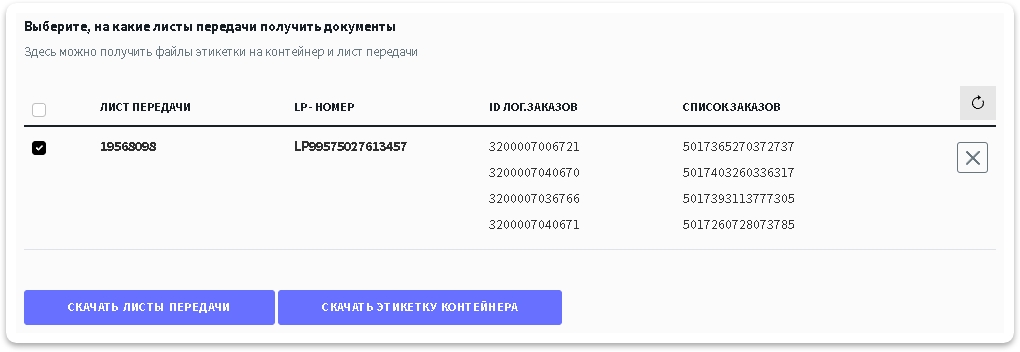
 и
и  ---
# Agent Instructions
This documentation is published with GitBook. GitBook is the documentation platform designed so that both humans and AI agents can read, navigate, and reason over technical content effectively. Learn more at gitbook.com.
## Querying This Documentation
If you need additional information that is not directly available in this page, you can query the documentation dynamically by asking a question.
Perform an HTTP GET request on the current page URL with the `ask` query parameter, and the optional `goal` query parameter:
```
GET https://topseller.gitbook.io/help/instruction/ts-connect/settings/aliexpress/logistics/transfer-sheets.md?ask=
---
# Agent Instructions
This documentation is published with GitBook. GitBook is the documentation platform designed so that both humans and AI agents can read, navigate, and reason over technical content effectively. Learn more at gitbook.com.
## Querying This Documentation
If you need additional information that is not directly available in this page, you can query the documentation dynamically by asking a question.
Perform an HTTP GET request on the current page URL with the `ask` query parameter, and the optional `goal` query parameter:
```
GET https://topseller.gitbook.io/help/instruction/ts-connect/settings/aliexpress/logistics/transfer-sheets.md?ask=