> For the complete documentation index, see [llms.txt](https://topseller.gitbook.io/help/llms.txt). Markdown versions of documentation pages are available by appending `.md` to page URLs; this page is available as [Markdown](https://topseller.gitbook.io/help/instruction/ts-connect/api/products/export-prices.md).
# Экспорт Цен
Используя эту функцию Вы можете автоматически экспортировать цены из учетной системы в Озон
{% hint style="info" %}
🧙♂️ **Примечание:** топовые версии Connect имеют дополнительные функции.
{% endhint %}
Функции во всех версиях
* Ручной экспорт цен
Функции в Standart и Pro
* То же, что и во всех версиях
* Возможность изменять цены при экспорте на определенный процент
* Автоматический экспорт цен
## ⬆️ Экспортировать цены из учетной системы в Озон
1. Зайдите в Connect и перейдите в раздел `Товары` подраздел `Экспорт цен`:
* в МойСклад в [OZON CONNECT](https://online.moysklad.ru/app/#apps?id=073727b8-26f6-4edb-8814-de239333328a)
* в отдельную версию [TOPSELLER PRO](https://pro.topseller.ru/)
2. Настройте соответствие полей
3. **Только для Standart и Pro:** например, если вы хотите сделать скидку, Вы можете в этом поле указать **-5%** или хотите сделать наценку указав **+5%.**
4. Нажмите кнопку  
5. Дождитесь завершения задачи.
{% hint style="info" %}
💡**Справка.** Отслеживать выполнение задач можно в специальной *"плашке"* справа в верхнем углу:
{% endhint %}
{% hint style="info" %}
💡**Справка.** При нажатии на нее откроется список выполняющихся задач и задач в очереди:
{% endhint %}
## 🤖 Автоматическое обновление цен *(Standart и Pro)*
1. Включите автоматическое обновление цен, перед этим так же настроив соответствие полей.
2. Нажмите кнопку

5. Дождитесь завершения задачи.
{% hint style="info" %}
💡**Справка.** Отслеживать выполнение задач можно в специальной *"плашке"* справа в верхнем углу:
{% endhint %}
{% hint style="info" %}
💡**Справка.** При нажатии на нее откроется список выполняющихся задач и задач в очереди:
{% endhint %}
## 🤖 Автоматическое обновление цен *(Standart и Pro)*
1. Включите автоматическое обновление цен, перед этим так же настроив соответствие полей.
2. Нажмите кнопку  {% hint style="warning" %}
🧠 **Важно!** На данный момент цены выгружаются только один раз ночью, но скоро появится доработка функции и цены будут выгружаться по факту изменения цен в товарах в учетной системе.
{% endhint %}
{% hint style="warning" %}
🧠 **Важно!** На данный момент цены выгружаются только один раз ночью, но скоро появится доработка функции и цены будут выгружаться по факту изменения цен в товарах в учетной системе.
{% endhint %}
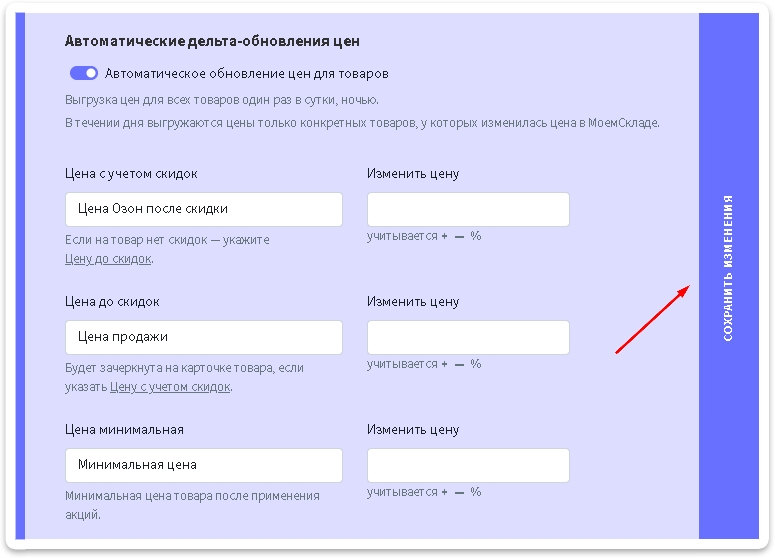 {% hint style="danger" %}
Кнопка может находиться в правой области браузера - особенность интерфейса Connect для МоегоСклада, который технически не позволяет разместить ее внизу формы, как все привыкли. И пользователи её теряли за полосой прокрутки. Поэтому теперь она находится справа - чтобы всегда быть в доступе и на виду.
{% endhint %}
---
# Agent Instructions
This documentation is published with GitBook. GitBook is the documentation platform designed so that both humans and AI agents can read, navigate, and reason over technical content effectively. Learn more at gitbook.com.
## Querying This Documentation
If you need additional information that is not directly available in this page, you can query the documentation dynamically by asking a question.
Perform an HTTP GET request on the current page URL with the `ask` query parameter, and the optional `goal` query parameter:
```
GET https://topseller.gitbook.io/help/instruction/ts-connect/api/products/export-prices.md?ask=&goal=
```
`ask` is the immediate question: it should be specific, self-contained, and written in natural language.
`goal` is optional and describes the broader end goal you are ultimately trying to accomplish on behalf of the user. GitBook uses it to tailor the answer towards what is most useful for that goal.
The response will contain a direct answer to the question and relevant excerpts and sources from the documentation.
Use this mechanism when the answer is not explicitly present in the current page, you need clarification or additional context, or you want to retrieve related documentation sections.
{% hint style="danger" %}
Кнопка может находиться в правой области браузера - особенность интерфейса Connect для МоегоСклада, который технически не позволяет разместить ее внизу формы, как все привыкли. И пользователи её теряли за полосой прокрутки. Поэтому теперь она находится справа - чтобы всегда быть в доступе и на виду.
{% endhint %}
---
# Agent Instructions
This documentation is published with GitBook. GitBook is the documentation platform designed so that both humans and AI agents can read, navigate, and reason over technical content effectively. Learn more at gitbook.com.
## Querying This Documentation
If you need additional information that is not directly available in this page, you can query the documentation dynamically by asking a question.
Perform an HTTP GET request on the current page URL with the `ask` query parameter, and the optional `goal` query parameter:
```
GET https://topseller.gitbook.io/help/instruction/ts-connect/api/products/export-prices.md?ask=&goal=
```
`ask` is the immediate question: it should be specific, self-contained, and written in natural language.
`goal` is optional and describes the broader end goal you are ultimately trying to accomplish on behalf of the user. GitBook uses it to tailor the answer towards what is most useful for that goal.
The response will contain a direct answer to the question and relevant excerpts and sources from the documentation.
Use this mechanism when the answer is not explicitly present in the current page, you need clarification or additional context, or you want to retrieve related documentation sections.